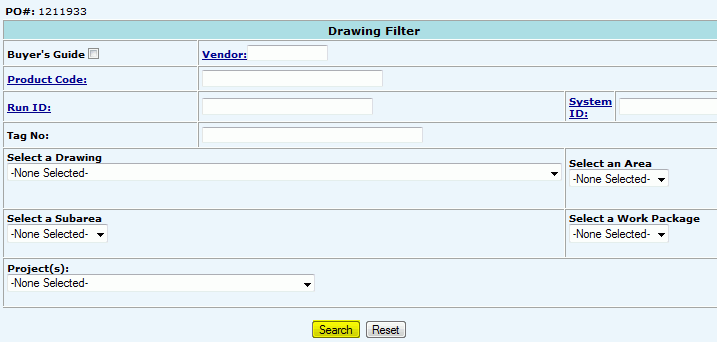
Allocate New Drawing Items
Fill
in appropriate Search Criteria to search for a list of drawing items
that match:
Buyers Guide: Check this box in conjunction with filling in the search criteria to present only items that need to be purchased according to the Project's Buyers Guide.
Vendor: Enter the Vendor number for the material supplier - search using the provided.
Product Code: Searching by this will return a list of all drawings within the project that contain the Product Code.
Run ID: Search by code used to identify cable, cable tray, or conduit run.
System ID: Search by code that identifies a particular system.
Tag No: Customer defined label for a single product.
Select a Drawing: Selected drawing will return all items within a drawing.
Select an Area: Selected area will return all items within an area.
Select a Subarea: Selected subarea will return all items within a subarea.
Select a Work Package: Selected work package will return all items within a work package.
Projects: (only appears when working
in a Master Project File)
Click Search.
For Whole Process Flow See: Process: Allocate Drawing Items.