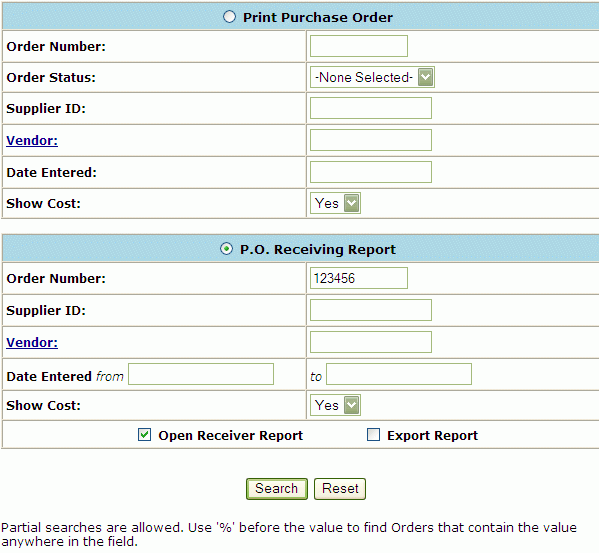
At the main menu, select Reports -> Order/Receiving. The Order/Receiving Reports screen will appear. Scroll down to the bottom of page and click on Open Receiver Report.
Please select a Report, fill in the criteria for that Report and click Search.
(Partial searches are allowed. Use '%' before the value to find Orders that contain the value anywhere in the field).
Click Reset to return to the values previously entered. Click Search if information is correct. A list of Open Receivers Orders are displayed.
Open Receiver Report
3 Items displayed
|
P.O. # |
Rec # |
Status |
Date Shipped |
Date Recv |
Recv By |
Inv # |
Inv Date |
Comments |
|
|
|
|
|
|
|
|
|
|
|
|
|
41 |
- |
|
|
|
|
|
|
|
|
|
|
|
|
|
|
|
|
|
|
|
|
42 |
- |
|
|
|
|
|
|
|
|
|
|
|
|
|
|
|
|
|
|
|
|
43 |
- |
|
|
|
|
|
|
|
Enter Select All, or select an individual selection box. After all items have been selected and modified, click Download Report. Open Receiver Report hyperlink . Click it and a Open Receiver Report will be generated.
To Print, you can either:
Click on the Printer Icon on your browser's, or you can download the report by clicking on the Download Report at the bottom of the report.
"Tips for download" Page. Click on the blue "HERE" hyperlink displayed at the top of the screen to actually perform the download.
The download option will generate a tab delimited ASCII text file. This file will be displayed in text format for viewing.
To request another report, use the BACK button on your browser to return to the Report Selection Screen.
This file format can be imported into any spreadsheet or database for further review. Save Target as a user-specified file. Right-Click on the blue "HERE" hyperlink displayed at the top of the screen. In the pop-up box displayed, highlight "Save Target As...." (A "Save As" Box will appear). Browse and select the file in which you want to save the Material Release Report. Click on the Save Button.
"Download Complete" will appear on your screen. To import into Excel, open the application and select the text file.