Add Items to Purchase Order
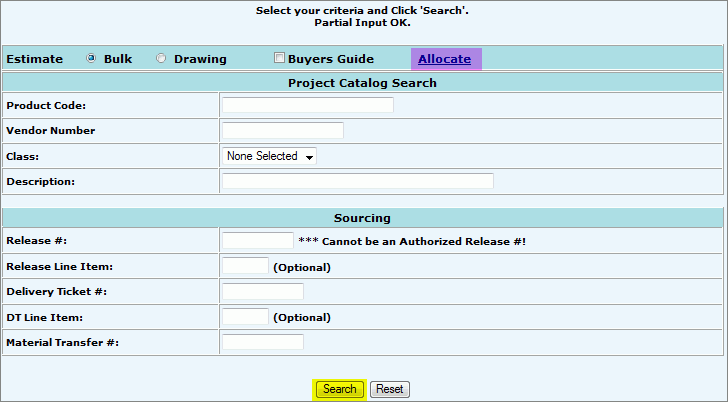
Search for Items to add to the Purchase Order on the Sourcing Input screen:
Select the Estimate radio button of either:
Bulk: The system will search and display the estimated quantity for each item/product within the entire project (all drawings).
Drawing: The system will search and display the estimated quantity of an item/product associated to a drawing.
(ex. Total estimate of 1/2" screws for the project is currently 1700 (Bulk) of which 300 (Drawing) have been assigned to specific drawings.)
Select the Buyers Guide Check box in conjunction with the radio buttons to return only items that need to be bought. (optional) This function is always used when ordering for a Consignment.
Enter Search Criteria:
Product Code: Unique number that represents an inventory item.
Vendor Number: Unique number that represents the company that sells material to the Electric Distributor for distribution.
Class: Determined based on activity level of an item during a twelve month period: A, B, C, D, F, N.
Description: Short description of item/product.
Release #: CMMS Release Number.
Release Line Item: Specific number assigned to release item.
Delivery Ticket #: Computer generated number when a Delivery Ticket is created.
DT Line Item: Specific number assigned to an item on a Delivery Ticket.
Material Transfer #: Number associated with a Material Transfer.
Click Search.
For Whole Process Flow See: Process: New Purchase Order.